

Sluggish download speeds, websites loading slowly (or not at all), lagging online Minecraft, videos that won’t stop buffering — all of these are signs of a slow internet connection. There are many reasons why you have slow internet but learn here with our tips on how to speed up your internet.
How you can increase your internet
1. Buy A Wi-Fi Extender
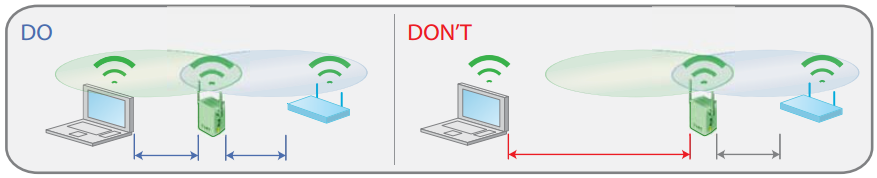
You've probably heard of this nifty device known as a Wi-Fi extender, Wi-Fi booster, and a Wi-Fi repeater. Wi-fi extenders expand the Wi-Fi coverage area in the house or if you have a thick wall and are quite crucial for larger homes. You will be able to see different speed test results in various areas. Unless you put every internet device in your house and use it together with your router there will be poor results at all times. The Wi-Fi extension device can increase the Wi-Fi signal in poor-coverage spaces.
2. Check Your Internet Cable
If you accidentally hit an electrical cord for an eternity, it is clear that the cable is not very durable. Internet cable does not meet that requirement. Integrating cables is crucial to ensuring dependable internet performance. It's also worth checking your cables for any speed problems. Look at bends, punctures, and tears as these will impact speed. Even with very careful handling of cable, children or pets can't. It is advisable to keep cables away. Outside of your house internet is vulnerable to animals. This is likely not a problem for anyone in the area.
3. Reboot Your Home Router
Rebooting your home router is an essential part of keeping the security, speed, and accessibility of home networks. Reboot it to help dispel hacking attempts; clear up limited memory for faster performance; download important updates that have been waiting on by manufacturers.
Step 1: Do not use pinholes and router reset buttons; instead unplug and plug the router from the power source, fully shutting it down.
Step 2: Leave unplugged for a few minutes.
Step 3: Plug your router back into the power source.
The key is to properly reboot your router. You don't want a factory reset, which will erase all of your settings and force you back at square one.
4. Close unnecessary background programs and applications
If you're experiencing slow internet speeds on your phone or laptop device but great connections elsewhere, it could be because of background programs or multiple apps. Quitting these unnecessary files will help speed up your connection!
Closing or putting unused apps to sleep will keep them from running in your background and keep your internet speed fast. But if you have a managed IT provider, like Frogworks do not delete background apps running due to security apps put in place.
5. Clear your browser’s cache and your browsing history
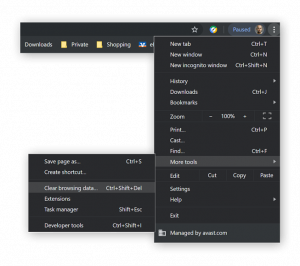
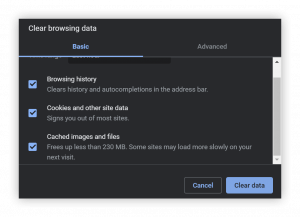
A lot of people don't know that their browser cache can cause problems with the speed or functionality of websites. If you're experiencing any issues, clear out this temporary memory and see if it makes a difference!
6. Get Closer To Your Router Or Move The Router Closer to Your Computer
When you're a few rooms away from your router, the speed of Internet access on both wired and wireless connections slows down. This is because it takes time for data to travel back down each physical cable leading up into an attic where many homes have their Wi-Fi antennas. When your device is physically closer to your router box the device will receive a faster internet connection.
7. Use plug-in cables instead of WIFI (Ethernet)
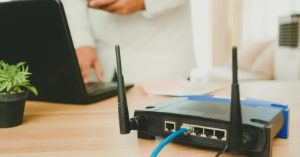
Wiring up your home is the most efficient way to get a fast and reliable internet connection. If you don't want to invest in a new router, try switching from Wi-Fi connections that can be slow at times to an Ethernet cable that will deliver high speeds and increase Gbps. Physical cables make for an ultimate high-quality networking experience - perfect when streaming videos online without any lag time!
8. Minimize router users
There are too many Wi-Fi signals crossing your room, which might cause drops in network performance. If you have more than one device connected to the same router and they’re not necessary for streaming or gaming purposes, then consider turning them off to improve speed & reliability!
How can I test my internet speed?
Your Internet Service Provider (ISP) should provide you with a speed test option, but in the event they don't, it's easy enough to find on Google. Run an internet speed test before and after making changes so that if there was any problems or issues can be seen more clearly than ever! If your internet speed is below the bar, it’s time to start optimizing.
